How to Cancel Booking & Get Refund on BusOnlineTicket.com?
Ticket cancellation can be processed via Member Panel or via Check My Booking page or via our Mobile Apps.
1
Understand the Requirement
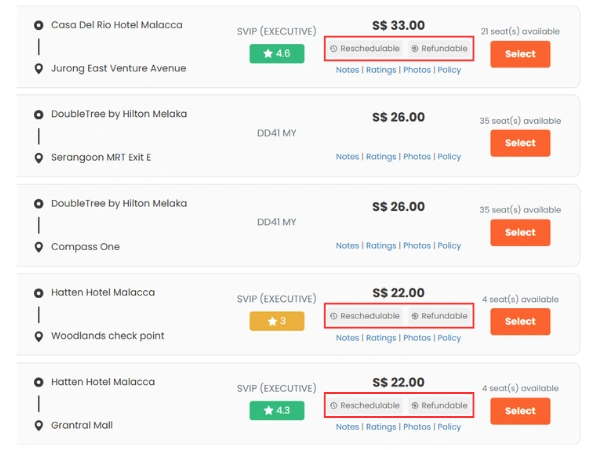
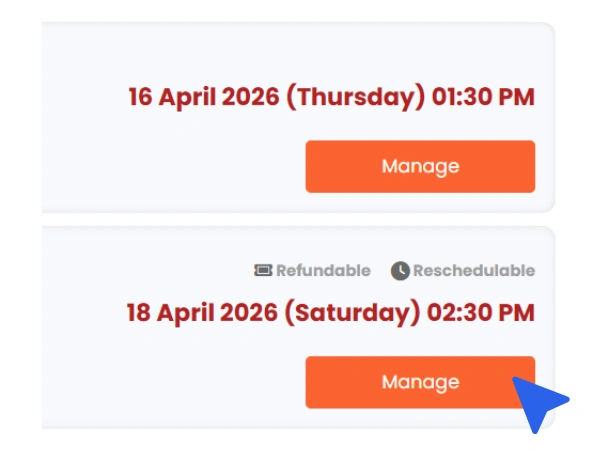
Make sure the trip is cancellable. A trip is cancellable when there is a “Refundable” icon and Refund Policy is available in the “Notes” when you make your booking.
2
Log In to Member Account
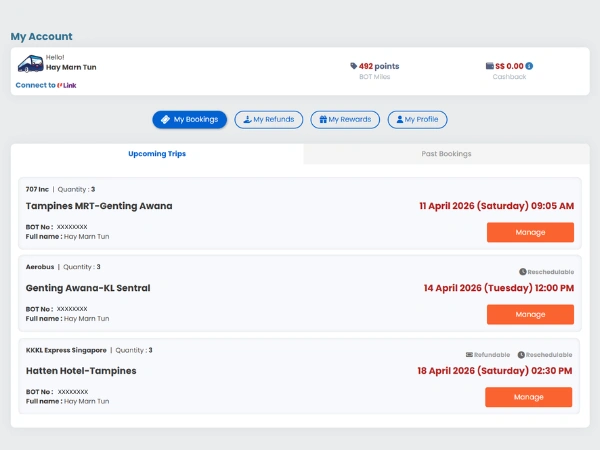
Log in to the BusOnlineTicket.com Member Account. Choose the cancellable trip by clicking on “Manage” to manage the trip.
3
Cancel Booking
If the trip is cancellable, you will see an option to “Cancel Booking”. Choose “Cancel Booking” if you want to cancel the booking.
4
Confirm Cancellation
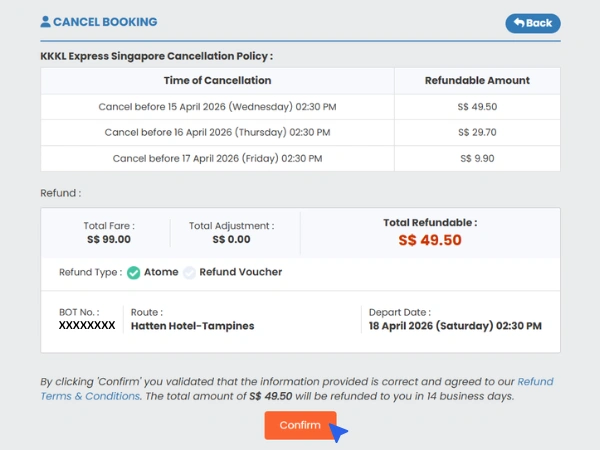
Different operator offers different Cancel & Refund Policy. Read the policy carefully before clicking on “Confirm” button to cancel your booking.
Note : Once a booking is cancelled, the particular booking history will be removed from your account and this action is irreversible.
5
Check Email
You will receive an email regarding your booking cancellation within 24 hours.
Note : All refunds will be refunded back via the payment method stated on the refund confirmation email within 14 business days.